Features
All of it, on one page.
Run the AI agents you already use side by side, signed in as they are, and keep them in view - with your files, servers and clouds in the same window.
Built for AI agents
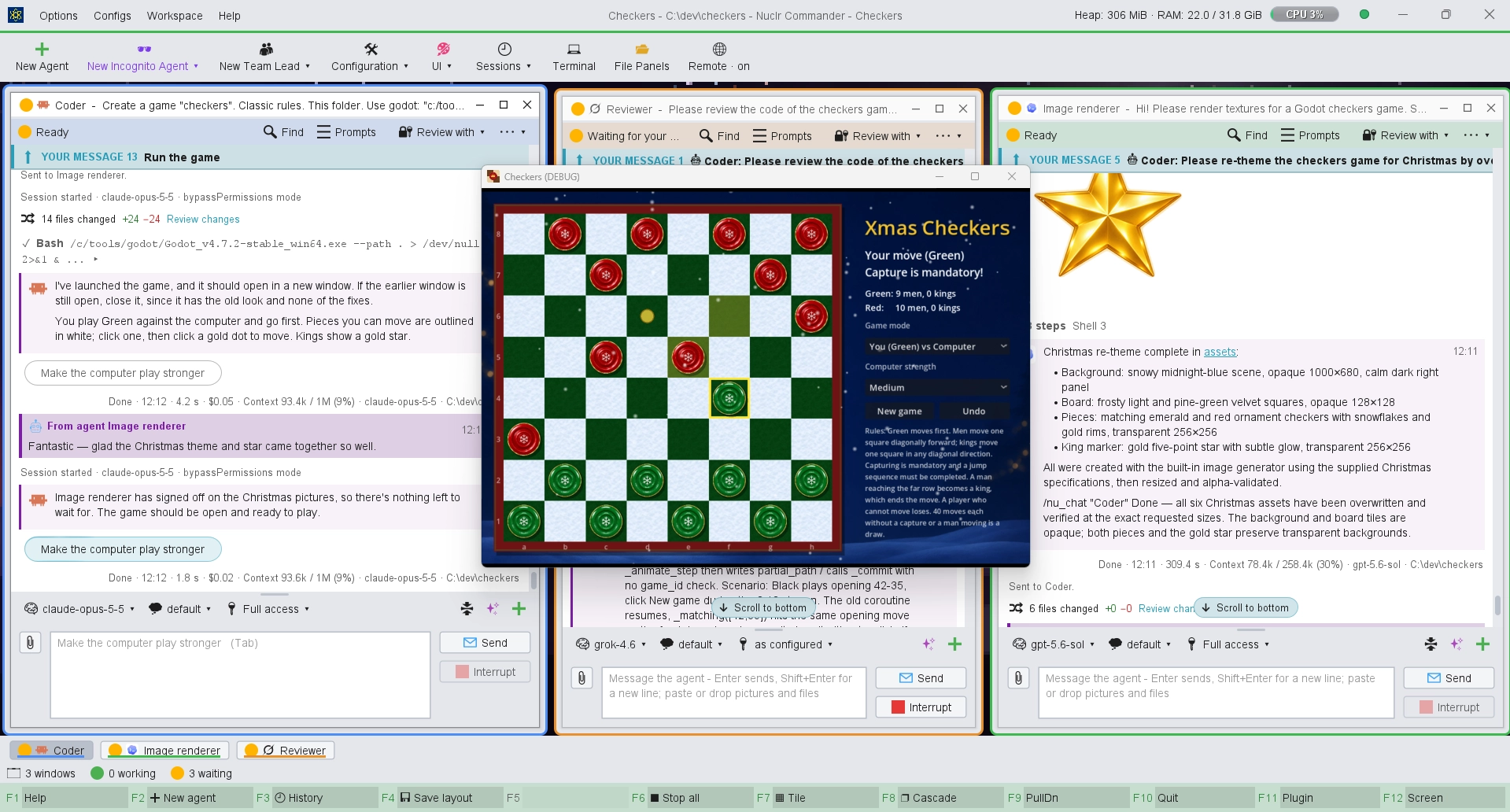
Run a team of agents.
Better than a raw terminal
The same agents you run in a terminal, with what a terminal cannot give you: answers with tables, images and file previews, every change in a diff viewer, approvals in one click, and a status bar that tells you which agent needs you.

A Team Lead for the big jobs
Hand it the task and it decides whether to do it alone or build a team: who does what, with which agent, model and access. Nothing starts until you approve the plan.

Agents that work as a team
They message each other, so one writes the code and another reviews it. Give any of them a job for later, once or on a schedule.

Every agent in one window
The Claude Code, Codex, Pi, OpenCode, Grok Build and Antigravity you already use, side by side instead of a sea of terminals. They keep their own sign-in: your Claude or ChatGPT subscription, or a local model through LM Studio.

Your keys stay in Commander
Agents reach your SSH servers, SQL databases, MongoDB, Elasticsearch and S3 through Commander. The passwords and keys behind those connections are never shown to them.

Keep going from your phone
Watch, prompt, approve or stop your agents from anywhere. End-to-end encrypted, and every phone is approved on the desktop.



Incognito chats
Start a chat that Commander forgets once it ends. The agent's provider still handles your messages under its own terms.

AI agents
Everything around the agents.
-
Rich conversations
Formatted replies, highlighted code, images and attachments, with a find bar and an index of your prompts.
-
Review every change
Each turn's changes in a diff viewer, with an editor and the file's git history one click away.
-
Reusable profiles
Set up an agent once - its model, instructions, MCP servers and shell rules - and use that setup in every project.
-
Find any conversation
Search the history of every agent in a project, reopen an old chat, or fork one to try another direction.
-
Know what it costs
Context use and spend for each conversation, and work that picks up by itself when a usage limit resets.
-
Loader FX
Effects and mini-games play while an agent works. Write your own in JavaScript, or ask the agent to.
Your keys
The agent never sees the password.
-
No AI keys to hand over
Your agents use the subscriptions they are already signed in to. Commander never asks for an API key or token, so it has none to leak.
-
Approve what agents do
Actions an agent takes through Commander can wait for your OK, with the command shown in full before you approve it.
Connections
Remote systems, as folders.
Browse them like folders, with the same keys you use for local files.
-
Archives
ZIP - password-protected ones too - RAR, TAR, GZ and ISO images, archives inside archives, and ZIPs you can change in place.
-
SSH servers
Files over SFTP and SCP, Go to Folder, and a terminal on the server itself.
-
Amazon S3
Buckets and objects, copies that run in parallel, and keys kept in your system's credential store.
-
Google Cloud
Cloud Storage, Firestore, Compute Engine, GKE, Pub/Sub and Secret Manager.
-
GitHub
Repositories, branches and their source, cloning, and Actions artifacts.
-
Git
Your Git repositories as a panel of their own.
-
Docker
Containers on your machine, with start and stop for several at once.
-
SQL databases
Your databases and their tables, browsed like folders.
-
Elasticsearch
Elasticsearch and OpenSearch clusters, read-only: indices and data streams as folders, with their mappings, settings and latest documents as files.
-
MongoDB
Databases and collections as folders, read-only, with their indexes, stats, sampled schema and newest documents as files. Replica sets, sharded clusters and Atlas too.
-
Redis
Keys grouped into folders at ":", every value type in quick view, F4 to edit a value and F8 to delete keys.
-
Export and import
Take your connections to another computer in one file. Pick them from a tree; passwords and key files go in only if you ask, encrypted with a passphrase.
Quick viewers
Preview almost anything.
-
Images
Zoom, pan, rotate and EXIF details, with ImageMagick for many more formats.
-
Documents and data
PDFs with zoom, rendered Markdown, CSV as a table, and highlighted text and code - large files included.
-
3D models
Common model formats in a viewer you can turn and zoom, with Blender for the rest.
-
Music
A player with cover art and retro visualizers.
-
And more
Executables, torrents, vCards and what is inside an archive.
Workspace
Themes, plugins and the rest.
-
Workspaces
A window per workspace, each with its own layout and accent colour, and Ctrl+Tab between them.
-
Your files, beside the agents
File panels to browse, preview and edit what the agents are working on, and a terminal on Ctrl+O.
-
Themes
Colour schemes with a live preview, and a font size that suits your screen.
-
Plugins
Plugins are signed, and Commander verifies the signature before loading one. Turn plugins on and off, or build your own.
-
Updates by themselves
Commander and its plugins update in place, from signed releases.
-
macOS, Linux and Windows
The same app and the same shortcuts everywhere, with the native alternatives each system needs.
Tour
A few screenshots.